Showing posts with label ORKUT TRICKS. Show all posts

Saturday, November 28, 2009

PLAY MUSIC IN YOUR ORKUT PROFILE WITHOUT APPLICATIONS

Hi friends,
                 There is a simple trick to play music in your profiles without any applications. Now the New Orkut is providing Testimonial option with HTML support. Thing you need to do is, ask any one of your friend to write testimonial or You itself create one more orkut account(It's Recommended by Jeho,because you can change your profile music often as your wish). Then Follow the steps shown below,

  • First of all get your favorite music's .SWF link from Any of the websites or convert your ordinary song format(mp3,wma,etc) to .SWF using all-in one convertor & then upload that in anyone of the file sharing websites such as fileden.com , ziddu.com ,4shared.com etc & get the link for that file
  • Then use the following HTML Code to write testimonial,as shown in the image below( Here an malayala song's link from fileden.com is used here)
<embed src="http://www.fileden.com/files/2009/3/25/2378733/scary/rockingrocking.swf type="application/x-shockwave-flash" width="1" height="1" flashvars="file=http://www.fileden.com/files/2009/11/19/2656218/a.swf &autostart=true /embed br /><p align="right"><br /></p>
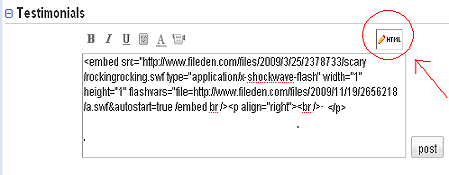


  • That's enough now you can here music in your profile
  • If you want to change the song, just replace the .SWF file with another one
If you have any doubts are comments, feel free to ask through comments

Related Articles: 

VIEW PHOTOS FROM LOCKED "ORKUT" ALBUMS

ORKUT MESSENGER- SCRAPBOY 

MULTIPLE(ORKUT,YAHOO,ETC) ACCOUNT SIGN IN USING FIREFOX ADD-ONS

FAST BROWSING WITH LITE VERSIONS 

SCRAP FORMATING TIPS FOR ORKUT

Saturday, November 21, 2009

SCRAP FORMATING TIPS FOR ORKUT

The Image shown below will give you the scrap formatting tips,


If you want to know any thing more about this, just ask through queries. 


Related Articles:

FAST BROWSING WITH LITE VERSIONS

MULTIPLE(ORKUT,YAHOO,ETC) ACCOUNT SIGN IN USING FIREFOX ADD ONS

ORKUT MESSENGER- SCRAPBOY

VIEW PHOTOS FROM LOCKED "ORKUT" ALBUM


Spread Firefox Affiliate Button

Sunday, November 15, 2009

CHANGE YOUR IP ADDRESS IN WINDOWS VISTA

Hi friends,
                      If you are using Windows vista, then follow these steps to change your IP address. The manual steps are given below.
  • Go to Start
  • Right click on Networks and select properties
  • Then click on Network and Sharing Centre
  • In the Network and sharing Centre window right click on Your Network card
  • Now select Diagnose and then select Windows Network Diagnostics.
  • In that select Reset the network adapter and allow Vista UAC control to proceed by clicking on Continue
Note: 
  • This method is possible,when your ISP can assign you dynamic IP address
  • Click here to know your IP address

Related Articles:

CHANGE YOUR IP ADDRESS IN WINDOWS XP

Saturday, November 14, 2009

CHANGE YOUR IP ADDRESS IN WINDOWS XP

Hi friends,
                   You may want to change your IP address for many purposes. Here are the simple steps to change your IP address in Windows XP Operating System. It can be changed Using two methods,one is by using Command prompt & another is to use simple manual method

Command Prompt Method:
  • Go to  Start then select Run
  • Type cmd on the Run window
  • Now the command prompt will open
  • Type ipconfig /release in the command prompt
  • After thet type ipconfig /renew
Manual Method:
  • Go to Start select Control panel or Settings (If you are using category view,please click on switch to classic view in the left side of control panel)
  • Now click on Network Connections.
  • Now you can see your internet connection (like dial-up connection)
  • Right click on your internet connection and select Disable and wait for some minutes to finish the process
  • Now again right click your internet connection and select Enable
Note: 
  • This method is possible,when your ISP can assign you dynamic IP address.
  • Click here to know your IP address

Wednesday, November 4, 2009

FAST BROWSING WITH LITE VERSIONS

Hi friend,
             Are you using dial-up or any other slow speed internet connection. If so, I hope you are suffering with the surfing of social networking & mail services. Now many of the ail services & social networking sites are providing there lite versions. So you just switch to the lite version. Now  Let us see about three main site's lite version switching methods. Its very simple..

Facebook:
                     It is very simple to switch from facebook standard version to Lite version. Just click on the link at right top of the page showing "Try Facebook Lite". Its shown in the image below


Orkut:
                 CIn Orkut, Its again very simple to change to Lite view. click on "Settings", Then there will be a page, in that you select "Show the low bandwidth version of orkut". & click on save changes. That's all.. Now You can orkut with speed. The image is shown below for your easy reference.


Gmail:
             It is again very very simple on Gmail. go to the bottom of the page,when you logged in.. There you can see a small link named "basic html".. Click on that.. That's enough......the image shows,where to click

Note: Some Lite versions may not offer chat facility. for example Gmail Lite(basic html view) doesn't support chat. In this case, download Gtalk & use it..


Sunday, October 11, 2009

MULTIPLE(ORKUT,YAHOO,ETC) ACCOUNT SIGN IN USING FIREFOX ADD ONS

Hi friends, you may be having multiple Orkut accounts for several purposes(friends, business,etc.,). But you can't access all those accounts at a same time on your computer. So that you are missing something. Now There is a solution for this problem. First of all,you must install Mozilla Firefox Browser(Click here to download & install ). 
            Then you have to install add-ons CookiePie  and CookieSwap  to Firefox. This is enough.  Now you can sign in using multiple accounts. It can be used in any accounts such as Gmail, Orkut, Yahoo,etc..

Sunday, September 27, 2009

ORKUT MESSENGER- SCRAPBOY

Hi friends, we all are using web browsers for logging-in to Orkut . but there is a portable Orkut messenger software. The name of the software is Orkut ScrapBoy. Using this software you can do everything related to orkut from your desktop itself. It is like Yahoo messenger. just check(tick) the check box @ Remember me. Check out the screenshots given below


                  Another good thing is that you can sign in to your Facebook and Myspace accounts along with Orkut at the same time. You can easily switch to one another without signing out from any of these social networking sites. Simply access your Orkut, Myspace, Facebook account at a time from one messenger. Could you imagine anything easier than this?
                                         Click here to download ScrapBoy

VIEW PHOTOS FROM LOCKED "ORKUT" ALBUMS

Hi friends, Orkut has a feature named photo tagging. This is used for tagging your friend's photos in different images. If a guy locked his album & which is tagged on another person's open(not locked) album, then you can see the locked photo. A simple Example,
  1. You want to see raja’s photos from his album, but he has locked his album. So, you can’t view his pics.
  2. dany is raja’s friend. dany has got few photographs of raja in his album. Technically it does not matter if dany is having raja’s individual or group photos.
  3. Now if few of those raja’s picture has been tagged in dany’s album and dany’s album is not locked, you can see raja’s pictures.
You might think that dany is having a unlocked album, so anyone can see his photos, including raja’s. So, what’s the big deal in the trick. dany might be having more than ten of his friend’s photos in his album, how would you recognize who is raja from those pics? Photo tagging made it simple, just roll your mouse over those pictures and a link to raja’s profile will appear when you take your mouse cursor on raja’s photo part. Treat the above lines as theory, let’s do practical now. Go to the person’s profile and notice the link “Photos of him” just below his profile name. Check out the below screenshot.


That link will display the number of tagged photos that user has got. Click on that link. Now if those tagged photos belong to a unlocked album, you will be able to see his/her photos on Orkut. Presently this is the only trick that you can follow to view someone’s photo even if his album is locked on Orkut.