Showing posts with label GOOGLE. Show all posts

Friday, December 11, 2009

GOOGLE DICTIONARY - ANOTHER USEFUL SERVICE FROM GOOGLE

Hi friends,
               You may be using some desktop dictionaries or some paper dictionaries (books) to see your doubts and know new words. But This is different them all. Because they all are not updated frequenty where as Google Dictionary is updated with new words frequently. The thing is that Google Dictionary Gives Meaning in more than 28 languages. Let us see how to use it..


  • Then type the word (to which you need meaning or synonym)
  • After clicking Search dictionary, the result will be displayed along with some web definitions at the bottom.


Related Articles:


Spread Firefox Affiliate Button

Tuesday, December 8, 2009

BROWSER EXTENSION FOR GOOGLE CHROME LAUNCHED

Hi friends,
        Like mozilla firefox, google chrome also going to have extensions. This was said by Erik Kay and Aaron Boodman, Software Engineers @ Chrome blog


They have said as follows
"These last few days, it seems that the extensions team has developed a newfound love for the F5 key. We all keep refreshing the "Most recent" page of our new gallery, obsessively checking the newest amazing extensions that developers have uploaded. Today, we get to share this nervous tic with millions of Google Chrome's users. We're launching extensions in the beta channel for Windows and Linux (Mac is in progress). We're also opening our gallery, which, as of now, contains more than 300 extensions!


An extension system has been one of our most requested features for Google Chrome. It's a tribute to Mozilla and the Firefox project that nowadays, users just expect all browsers to have built-in extensibility.


We started the project by presenting a design doc that outlined our vision to create an extensions system based on web technologies - a system that is easy to use, stable, more secure and that wouldn't slow down Google Chrome. It wasn't always easy to balance our goals, and sometimes we had to make tough trade-offs.


Since we built all of this in the open, we had tons of help. Developers started using our code shortly after the first check-in, and have been sending us feedback on our mailing list ever since. Being able to see the extensions people were trying to build and the problems they faced made it more fun to design the system, and motivated us to keep fixing the bugs.


Today, we're really happy to release a beta of extensions that begins to deliver on our initial vision. Extensions are as easy to create as webpages. Users can install and uninstall them quickly without restart, and extensions have a great polished look that fits in with Google Chrome's minimalist aesthetic. When developers upload an extension it is available to users immediately, with limited restrictions and manual reviews only in a few situations.


On the technical side, we've been able to use Google Chrome's multiprocess architecture to help keep extensions stable and safe. And Chromium's extensive performance monitoring infrastructure has helped us ensure extensions affect Google Chrome's speed as little as possible. You can learn more details about the internals of our system in the videos below.

We still have a long way to go - next up, we're going to be working hard to get extensions to all Google Chrome users, and we're already brainstorming the next set of API improvements. Oh and, we should also fix some bugs ;-).


For those of you who want to learn more about extensions, let us know if you want to join us in a small get together tomorrow in our campus in Mountain View. Space is limited - we'd love to see many of you there so do RSVP early and we'll email you more information if are selected to attend. You can also meet with our team at Add-on Con, where we are going to participate in a couple of panels. Finally for those of you who are far away, we are planning some online developer tutorial sessions. If you are interested in attending these, please fill in this form."


It's really a happy news for us to have chrome with extensions

Related Posts:

DOWNLOAD CHROME OFFLINE INSTALLER

GOOGLE'S HONESTY -THE REASON WHY IT IS ON TOP


Spread Firefox Affiliate Button

Saturday, November 28, 2009

PLAY MUSIC IN YOUR ORKUT PROFILE WITHOUT APPLICATIONS

Hi friends,
                 There is a simple trick to play music in your profiles without any applications. Now the New Orkut is providing Testimonial option with HTML support. Thing you need to do is, ask any one of your friend to write testimonial or You itself create one more orkut account(It's Recommended by Jeho,because you can change your profile music often as your wish). Then Follow the steps shown below,

  • First of all get your favorite music's .SWF link from Any of the websites or convert your ordinary song format(mp3,wma,etc) to .SWF using all-in one convertor & then upload that in anyone of the file sharing websites such as fileden.com , ziddu.com ,4shared.com etc & get the link for that file
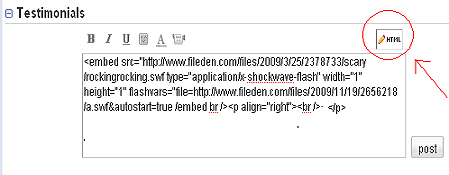
  • Then use the following HTML Code to write testimonial,as shown in the image below( Here an malayala song's link from fileden.com is used here)
<embed src="http://www.fileden.com/files/2009/3/25/2378733/scary/rockingrocking.swf type="application/x-shockwave-flash" width="1" height="1" flashvars="file=http://www.fileden.com/files/2009/11/19/2656218/a.swf &autostart=true /embed br /><p align="right"><br /></p>


  • That's enough now you can here music in your profile
  • If you want to change the song, just replace the .SWF file with another one
If you have any doubts are comments, feel free to ask through comments

Related Articles: 

VIEW PHOTOS FROM LOCKED "ORKUT" ALBUMS

ORKUT MESSENGER- SCRAPBOY 

MULTIPLE(ORKUT,YAHOO,ETC) ACCOUNT SIGN IN USING FIREFOX ADD-ONS

FAST BROWSING WITH LITE VERSIONS 

SCRAP FORMATING TIPS FOR ORKUT

Monday, November 23, 2009

GET DOCUMENTS LIKE PDF AS RESULT IN GOOGLE SEARCH

Hi friends,
                You may want to search Google for getting some specific file types (documents) as the results. but in ordinary(searching for web) mode of searching, you may not get some specific type of files as results. so you must use the advanced search option given in Google.
                                                For example, downloading a PDF Document related "image processing", follow the steps below
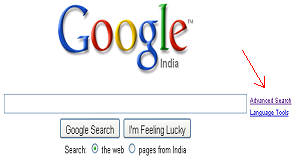
  • First of all select "Advanced search" option from google as shown in the snap here,

 
  • Now type the word "image processing" onto the search box
  • Select the file format as Adobe Acrobat PDF (.pdf) as shown in the snap below &  click on to the advanced search button.

 
  • All the results will be PDF documents & you can download yours interested pdf documents directly from there ...
Related Articles:
  Articles about Orkut tricks and tips

Wednesday, November 18, 2009

GOOGLE'S HONESTY -THE REASON WHY IT IS ON TOP....

Hi friends,
                  I was going on searching why Google is best for searching and doing so many things related to internet surfing. Different people have said different thoughts about Google and its search engine algorithm. But i was thinking," This is not a right answer for me"..  Because Every search engine in web are providing some nice search results nearly 90% similar to google.
                                                          Finally I found the simple reason,when i try to get download link for Google Chrome (Web browser). I have given the search Keywords as "fastest web browser" , "fastest web browser download" and "best web browser download" in Google search Engine .. I expected that Google Chrome will be the first result. But I was shocked because of the result. Because it shows Apple's Safari in first position and Mozilla firefox & Opera in the Next positions. This is the honesty of Google. If Google wants,it can show its Google Chrome at First Position. But It didn't do that.See The Snap here


                                                             Now I realized, Why Google is on top & King of search Engines. You can check the Snap here.


Related Articles:

Wednesday, November 11, 2009

GO - THE NEW PROGRAMMING LANGUAGE FROM GOOGLE

Hi friends,
                 Good News for programmers from Google. Google Introduces its new programming language named "GO". It has been designed by designed by Robert Griesemer and Unix/Plan 9 veterans Rob Pike and Ken Thompson. 

                     Go is offering fast compilation, good performance, an expressive type system and built in language features. Go is an open sourced Programming language, which combines security and performance orientation benefits of static(compiled) programming languages like C++ with the speed of dynamic programming language(example: python). A simple code's screenshot is shown here


                         It is expected to be the fastest programming language and quite parallel to C Even huge imposing binaries is compiling in just few seconds.It will be a great and nice tool for multiprocessing  & fresh and light weight object oriented design. It has few features such as true closures,reflection,etc.,
                     Concurrency is done here using goroutines.. Start doing programs....with gooooooooooo...
Official Link for Go: http://golang.org/

Sunday, September 27, 2009

WEATHER FORECAST AND WORLD TIME IN GOOGLE

Hi friends,
                                      To get the time in another place in the world quickly, just type in time followed by the place (city). Eg, time london.


                   Want to know if it'll be sunny for that perfect outing? For a four-day weather forecast, type weather followed by the city of choice. For example, weather Mumbai would return


Spread Firefox Affiliate Button

Friday, September 25, 2009

GOOGLE CAN BE USED AS CALCULATOR

Google can function as a calculator. It understands the following symbols:
Symbol
Explanation
+
Add
-
Subtract
*
Multiply
/
Divide
% of
Find the percentage of a number. Eg, 26% of 43.5
^
Exponent/to the power of
root of
Eg, square root of 16, cube root of 9, 6th root of 36 etc.
You can also use parentheses to determine order of operations, and Google also understands logarithms, trigonometry and factorials.

It can sometimes be quicker to use Google rather than the inbuilt calculator app.
Spread Firefox Affiliate Button

Sunday, September 20, 2009

DESKTOP GOOGLE READER

Desktop Google Reader is a free to use desktop client for google reader which is designed to run on windows from xp to windows 7, it makes possible to read all your feeds from this application directly without opening your browser like firefox, internet explorer.
                       This program is very small in size and no need to install it as it is completely portable to use, you just need double click the program executable to run it. After some time of use you will get to know that this program is currently under development so the features are very basic and they will improve in upcoming versions